Booking in a chat
What clients can do by messaging you, and what happens on your calendar.
Booking in a chat is on the Pro plan, and it runs on your own WhatsApp Business Account. Messages come from your number, not ours, so your clients see your business - and the conversation stays yours if you ever leave. Connecting it is a one-off, and the setup guide walks through it.
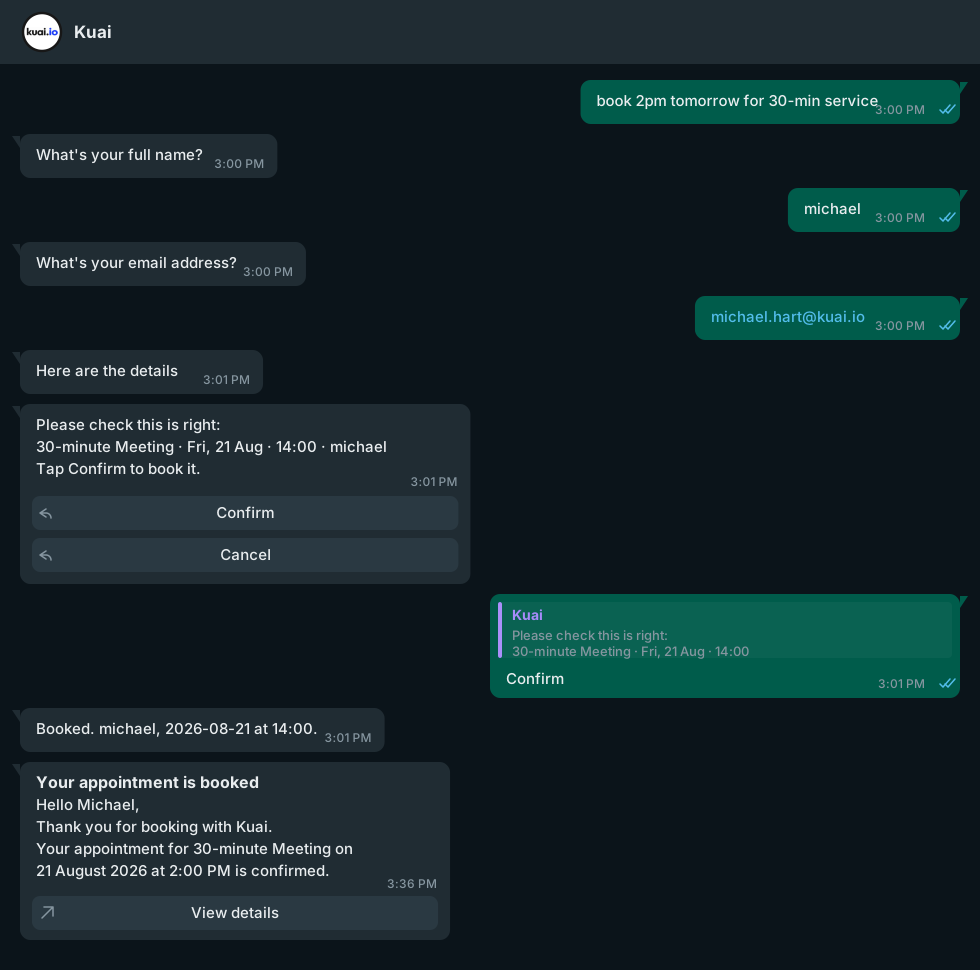
A client messaging your WhatsApp number can ask what you offer, when you are free, and book a time. They are shown your real availability - the same start times your booking page would offer, with the same interval, gap policy and lead time.
Nothing is booked without a confirmation
Before anything reaches your calendar the client is shown a summary - service, team member, date and time - with Confirm and Cancel buttons. The booking is made from what is on that card when they tap Confirm, so what they agreed to is what gets booked.
If you take payment
Where the service is paid for online, Confirm sends a payment link and the slot is held while they pay, so nobody else can take it mid-checkout. An abandoned checkout releases the slot on its own.
Did this leave something out? Email support@kuai.io.